OMGF | GDPR/DSGVO Compliant, Faster Google Fonts. Easy.

- Active installs
- 300k+
- 213 ratings
- 4.7
- Last updated
- 6 days ago
- Version
- 6.3.13
- Tested up to
- WP 7.1.3
About this plugin
OMGF can be downloaded for free without any paid subscription from the official WordPress repository.
How could using fonts via Google’s service possibly run afoul of GDPR? The fact of the matter is that, when a font is requested by the user’s browser, their IP is logged by Google and used for analytics.
— Lifehacker
Leverage Browser Cache, reduce DNS lookups/requests, reduce Cumulative Layout Shift and make your Google Fonts 100% GDPR-compliant with OMGF!
OMGF is written with performance and user-friendliness in mind. It uses the Google Fonts API to automatically cache the fonts your theme and plugins use to minimize DNS requests and speed up your WordPress website.
How Does It Work?
After installing and configuring the plugin, OMGF will automatically start looking for Google Fonts whenever a page is requested on your website.
All Google Fonts are listed in the Optimize Local Fonts section of OMGF’s settings screen. There, you can choose to:
- Preload fonts to reduce Cumulative Layout Shift above the fold.
- Unload fonts that’re not used by you, your theme, and/or plugins.
- Set a Fallback Font Stack (OMGF Pro required), to further reduce Cumulative Layout Shift, or
- Enable Magic Fallbacks (OMGF Pro required), to automatically generate mathematically tuned system font fallbacks that match your Google Fonts’ exact proportions, eliminating layout shift while fonts load.
- Replace (OMGF Pro required) font-families with system fonts to speed up loading times!
Other Features include
- The integrated Google Fonts checker notifies you if a plugin or your theme has added Google Fonts (e.g., after an update) it can’t process.
- The Performance Checker automatically monitors your Google Fonts’ performance and notifies you about potential improvements in 4 areas:
- Unused subsets — subsets that are downloaded but never used, increasing Total Blocking Time,
- Unused font styles/weights — font variants that are loaded but not used, causing unused CSS,
- Missing preloads — fonts used above the fold that aren’t preloaded, increasing Largest Contentful Paint and First Contentful Paint,
- Cumulative Layout Shift — layout shift caused by fonts loading after the page is rendered.
- Variable Fonts support,
- Remove Resource Hints (preload, preconnect, dns-prefetch) pointing to
fonts.googleapis.comor
fonts.gstatic.com,- Ensure text remains visible during webfont load by forcing the font-display attribute to your Google Fonts,
- Ensure text remains visible during webfont load by forcing the font-display attribute to all your other fonts! (OMGF Pro required),
Additional Features in OMGF Pro
- Smart Optimize automatically detects which fonts, subsets, and weights are actually used on each page — preloading the ones that matter and removing the ones that don’t, to eliminate render-blocking resources and reduce unused CSS.
- Magic Fallbacks generates mathematically tuned system font fallbacks that match your Google Fonts’ exact proportions, eliminating layout shift while fonts load.
- Automatically configures itself to make sure all externally hosted Google Fonts on your site are hosted locally. OMGF Pro supports:
@font-faceand@importstatements inside inline<style>blocks,@font-faceand@importstatements inside local stylesheets loaded by e.g. your theme and/or plugins,@font-faceand@importstatements inside externally hosted stylesheets loaded by your theme and/or
plugins,- Web Font Loader (
webfont.js), - Async Google Fonts (loaded using JS)
- Material Icons.
- Multisite and WPML support.
- Whitelabel stylesheets, which removes branding and comments from the stylesheets to further reduce the size.
- Modify your fonts’
src: url()attribute to fully integrate with your configuration,- Use this to serve fonts and the stylesheets from your CDN, or
- To serve fonts from an alternative path (e.g. when you’re using Security through Obscurity plugins like WP Hide,
etc.), or - Anything you like!
- Developer Mode, which allows you to easily migrate between Development, Staging/Testing, Acceptance and Production
environments.
Screenshots
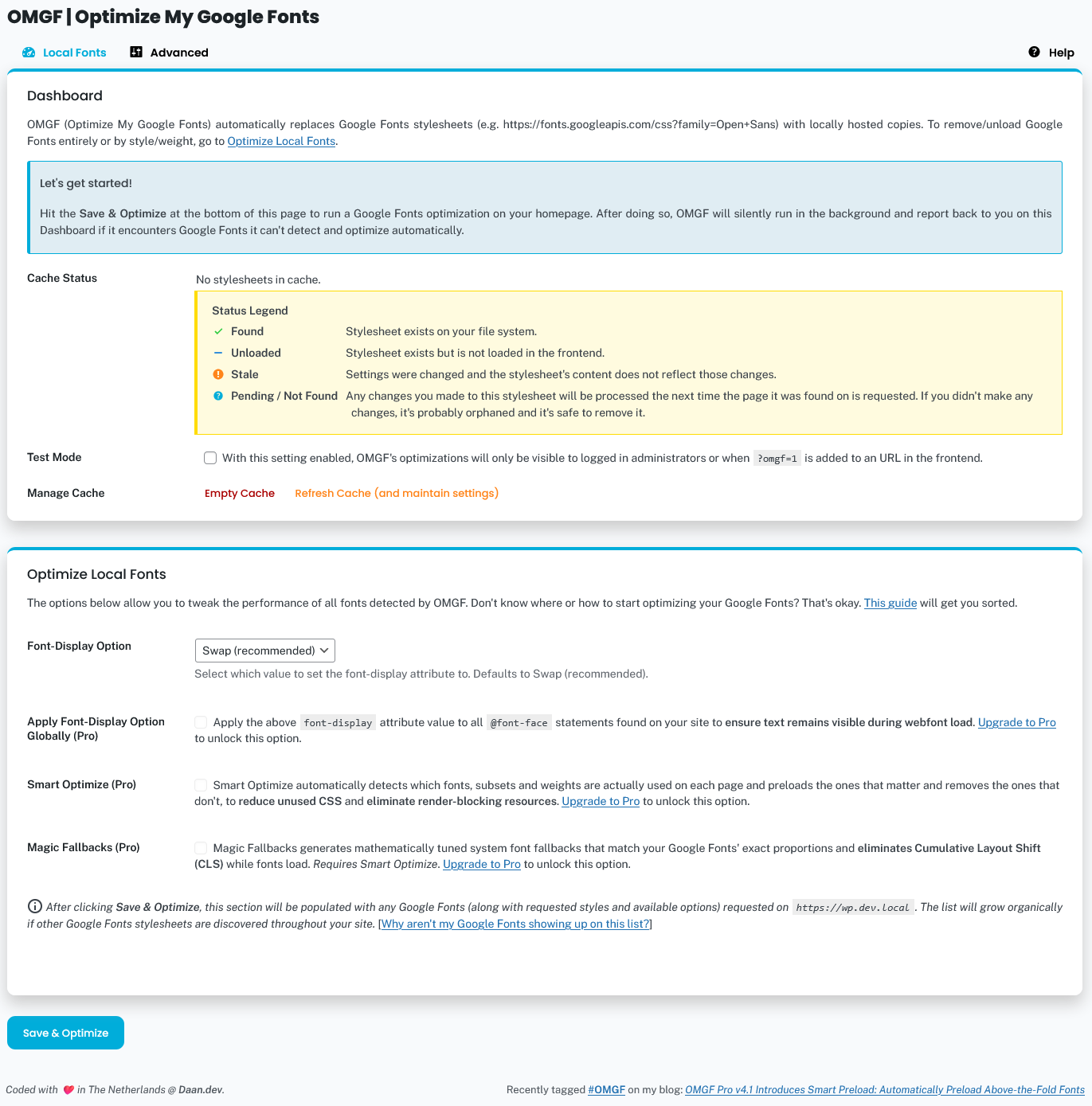 OMGF's Local Fonts screen. These settings affect the downloaded files and generated stylesheet(s).
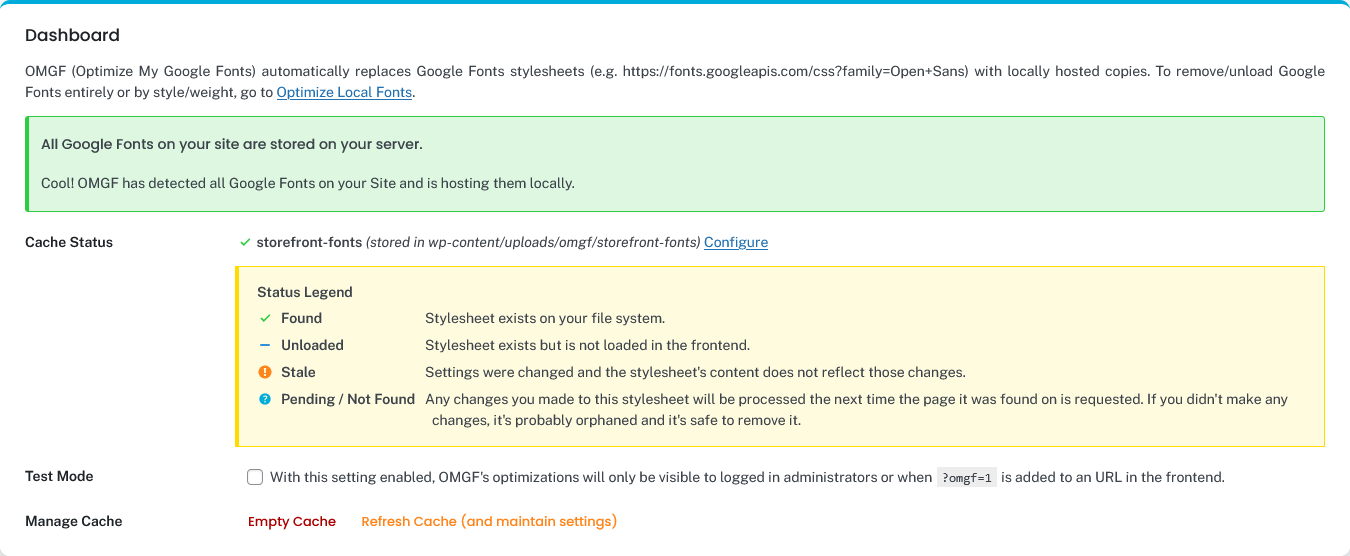 The dashboard offers a quick overview of possible configurational issues (and solutions), the status of cached fonts/stylesheets along with quick links to simple management tasks e.g., Empty Cache and Configure/Remove.
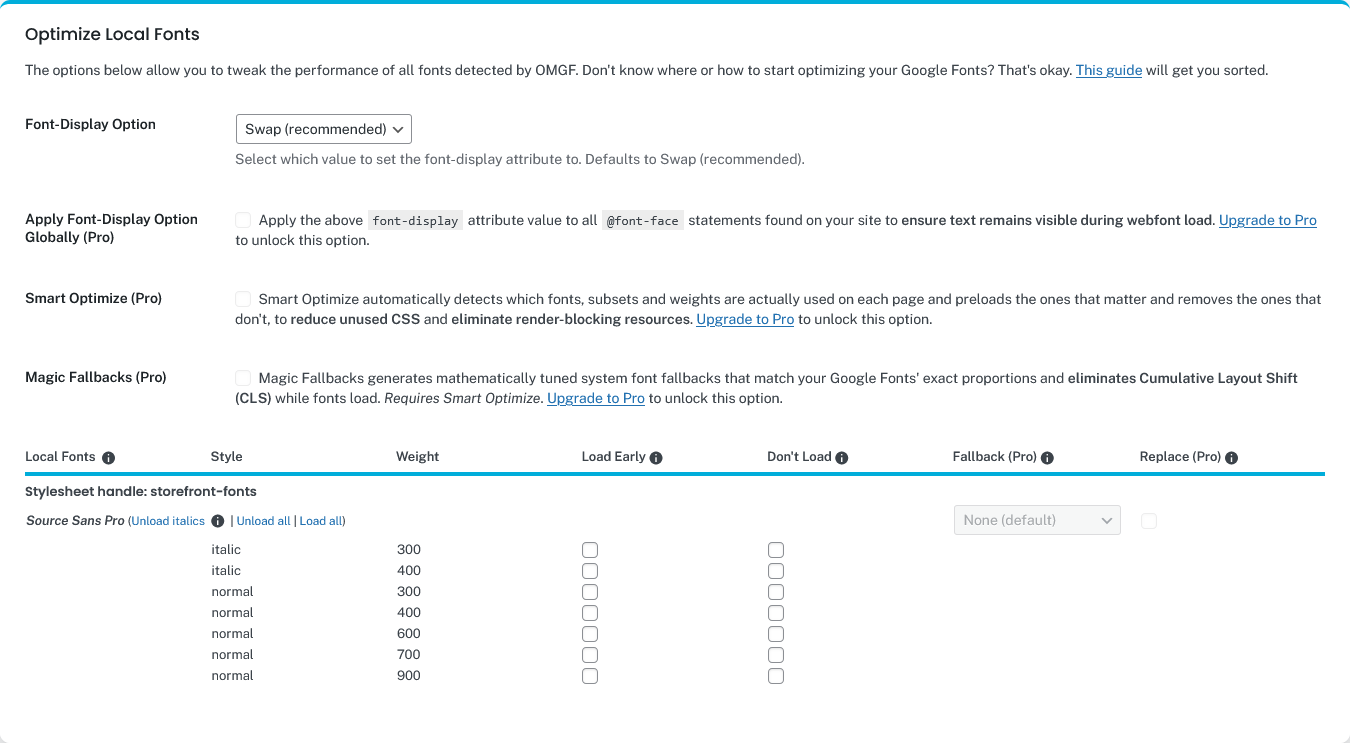 After you've completed configuring OMGF, the Optimize Local Fonts section will allow you to tweak all of your Google Fonts stylesheets by e.g., unloading unused fonts and/or preloading fonts above the fold.
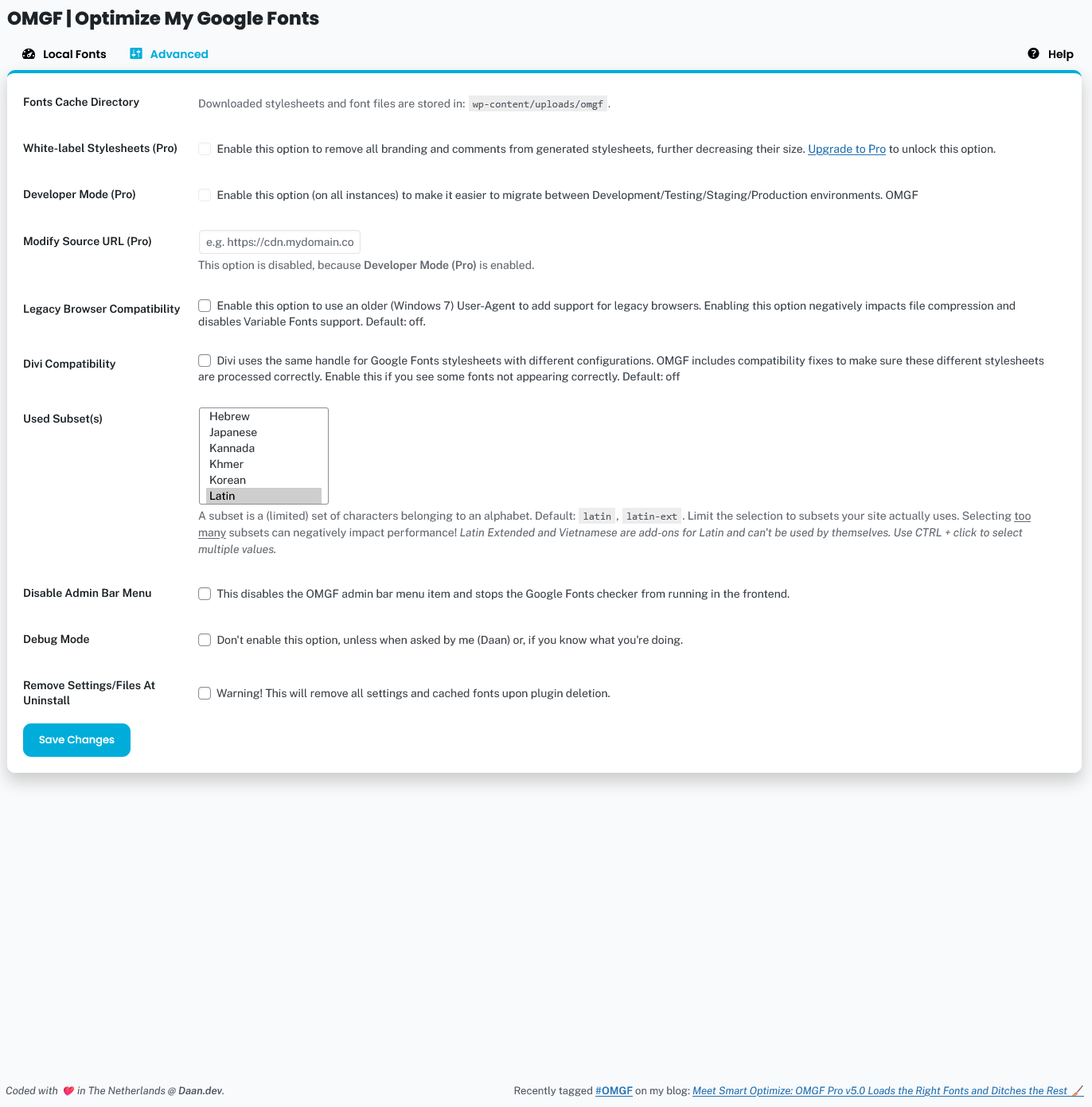 Advanced Settings. Change these to make OMGF work with your configuration (if needed). The default settings will suffice for most configurations.
Analytics
Live from WordPress.org, refreshed daily. Last refresh Oct 18, 2026.
- Downloads on a typical day are up 201% on the month before.
- #4 by installs among 52 tracked plugins tagged "Google".
- Passes 3 of 4 health checks below.
Health checks
What a careful site owner looks at before installing.
- Actively maintained Last release 6 days ago
- Tested with current WordPress Tested up to 7.1.3
- Support questions answered 0 of 1 resolved in two months
- Well rated 4.7 stars from 213 ratings
- Latest week
- 138,734
- Typical week
- 24,166
- Peak
- 219,139 Week of Mar 29
View as table
| Week | Downloads |
|---|---|
| Week of Oct 11 | 138,734 |
| Week of Oct 4 | 34,558 |
| Week of Sep 27 | 140,467 |
| Week of Sep 20 | 142,493 |
| Week of Sep 13 | 8,508 |
| Week of Sep 6 | 9,545 |
| Week of Aug 30 | 12,699 |
| Week of Aug 23 | 15,618 |
| Week of Aug 16 | 26,270 |
| Week of Aug 9 | 141,388 |
| Week of Aug 2 | 38,423 |
| Week of Jul 26 | 123,500 |
| Week of Jul 19 | 13,856 |
| Week of Jul 12 | 13,594 |
| Week of Jul 5 | 22,298 |
| Week of Jun 28 | 36,995 |
| Week of Jun 21 | 130,333 |
| Week of Jun 14 | 131,852 |
| Week of Jun 7 | 32,063 |
| Week of May 31 | 124,742 |
| Week of May 24 | 17,575 |
| Week of May 17 | 36,067 |
| Week of May 10 | 124,923 |
| Week of May 3 | 16,044 |
| Week of Apr 26 | 16,326 |
| Week of Apr 19 | 23,210 |
| Week of Apr 12 | 144,573 |
| Week of Apr 5 | 125,467 |
| Week of Mar 29 | 219,139 |
| Week of Mar 22 | 134,084 |
| Week of Mar 15 | 13,963 |
| Week of Mar 8 | 20,846 |
| Week of Mar 1 | 25,121 |
| Week of Feb 22 | 144,465 |
| Week of Feb 15 | 129,073 |
| Week of Feb 8 | 13,742 |
| Week of Feb 1 | 27,410 |
| Week of Jan 25 | 137,397 |
| Week of Jan 18 | 122,795 |
| Week of Jan 11 | 8,214 |
| Week of Jan 4 | 9,776 |
| Week of Dec 28, 2025 | 7,292 |
| Week of Dec 21, 2025 | 7,190 |
| Week of Dec 14, 2025 | 13,200 |
| Week of Dec 7, 2025 | 20,684 |
| Week of Nov 30, 2025 | 137,677 |
| Week of Nov 23, 2025 | 7,375 |
| Week of Nov 16, 2025 | 8,231 |
| Week of Nov 9, 2025 | 9,347 |
| Week of Nov 2, 2025 | 11,779 |
| Week of Oct 26, 2025 | 12,925 |
| Week of Oct 19, 2025 | 16,136 |
- Active installs #175 of 6,207 ranked plugins Top 3%
- Trending #29 of 1,650 ranked plugins Top 2%
- Downloads this week #60 of 6,207 ranked plugins Top 1%
- Rating #1,226 of 2,932 ranked plugins Top 42%
- Tagged "Google" #4 of 52 by installs Top 8%
- Tagged "Gdpr" #7 of 81 by installs Top 9%
- Tagged "Cache" #6 of 70 by installs Top 9%
Gathering install data
WordPress.org only publishes today's install count, so WPFolks records it every day. The chart appears here once there is enough history to draw.
Reviews
From folks on WPFolks
No reviews from folks yet. Used it? Be the first to say how it went.