
- Active installs
- 20+
- 1 rating
- 5.0
- Last updated
- 4 months ago
- Version
- 1.3.1
- Tested up to
- WP 7.0.7
About this plugin
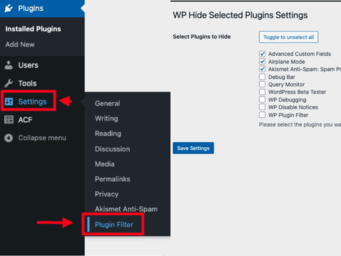
WP Plugin Filter is a simple and lightweight WordPress plugin that allows you to hide specific plugins from the plugin list in the WordPress admin dashboard. This can be useful if you have plugins that are intended for internal use only or plugins that don’t require user interaction.
Once activated, WP Plugin Filter provides an easy-to-use interface where you can select which plugins you want to hide. The selected plugins will no longer appear in the plugin list, making it easier to manage your installed plugins.
Features
- Hide selected plugins from the WordPress plugin list.
- Easy-to-use interface for managing hidden plugins.
- Lightweight and optimized for performance.
- Does not affect the functionality of the hidden plugins, they remain active and functional.
Support & Documentation:
You can check out our Documentation to get started with WP Plugin Filter and explore how to use it effectively. If you encounter any issues or need help, visit the Support Forum to post your query or read through existing topics for solutions.
1.3.1 – 2026-06-20
- New Feature: Added Access & Role Control settings to restrict plugin filter configuration to specific user roles.
- Improvement: Moved settings page to a dedicated top-level admin menu positioned after Plugins.
- Security: Added capability and role checks to hide/unhide and bulk action endpoints.
- Bug Fix: Fixed undefined variable causing the “Visible” tab to show incorrectly.
- Bug Fix: Fixed enqueued assets versioning and removed discouraged translation load.
- Bug Fix: Cleaned up duplicate admin settings files and removed hidden OS files.
1.3.0 – 2025-01-30
- Improved hide logic in plugins
- Improved How All and Visible is displayed
1.2.9 – 2025-01-27
- Fixed some styling issues
- Improvement: Fixed typos in plugin status labels
1.2.8 – 2025-01-27
- Improvement: Fixed text from “Hidden Tab Position” to “Hidden Group Position.”
- Improvement: Adjusted line spacing for consistency in plugin status lists.
- Improvement: Made the “Hide Plugin Status Group” list non-scrollable for better usability.
- Bug Fix: Resolved issue where the “Recently Active” group disappears when clicking the “Hidden” group.
- Bug Fix: Corrected “All” group count and behavior when switching between groups.
1.2.7 – 2025-01-27
- Added the option to toggle select all
1.2.6 – 2025-01-26
- Improve the Plugins Status Select, and added the option hide autocomplete Enabled
1.2.5 – 2025-01-25
- Bug Fix: Ensured that the “Hidden” tab position setting is respected on the plugins page. The “Hidden” tab is now correctly inserted after the “Active” tab or the “Auto-Update Disabled” tab based on the user’s selection.
1.2.4 – 2025-01-26
- New Feature: Introduced the ability to choose the position of the “Hidden” tab in the plugin status links on the plugins page. The position can be set to “After Active” or “Default Position” through the settings page.
- New Feature: Added the “Hide Unused Plugin Status” setting to hide specific plugin status links from the plugins list.
- Enhanced the settings page to include the new options for managing the “Hidden” tab position and hiding unused plugin status links.
1.2.3 – 2025-01-25
- Fixed some typos
- Improved code formatting
1.2.0 – 2025-01-25
- Added functionality to hide selected plugins from the plugins list.
- Added settings page to manage hidden plugins.
- Included options to toggle the selection of all plugins.
- Ensured that only the user who hides the plugins can see them.
- Added support for multisite environments with appropriate settings link.
- Implemented translation support with text domain wp-plugin-filter.
1.0.0
- Initial release.
License
WP Plugin Filter is licensed under the GPLv2 or later.
License URI: https://www.gnu.org/licenses/gpl-2.0.html
Screenshots


Analytics
Live from WordPress.org, refreshed daily. Last refresh Oct 17, 2026.
- Passes every health check below.
Health checks
Everything a careful site owner looks at before installing.
- Actively maintained Last release 4 months ago
- Tested with current WordPress Tested up to 7.0.7
- Support questions answered Nothing open in the last two months
- Well rated Only 1 rating so far
- Latest week
- 17
- Typical week
- 13
- Peak
- 67 Week of Jun 20
View as table
| Week | Downloads |
|---|---|
| Week of Oct 10 | 17 |
| Week of Oct 3 | 15 |
| Week of Sep 26 | 25 |
| Week of Sep 19 | 20 |
| Week of Sep 12 | 30 |
| Week of Sep 5 | 15 |
| Week of Aug 29 | 19 |
| Week of Aug 22 | 38 |
| Week of Aug 15 | 19 |
| Week of Aug 8 | 19 |
| Week of Aug 1 | 24 |
| Week of Jul 25 | 15 |
| Week of Jul 18 | 13 |
| Week of Jul 11 | 14 |
| Week of Jul 4 | 13 |
| Week of Jun 27 | 8 |
| Week of Jun 20 | 67 |
| Week of Jun 13 | 15 |
| Week of Jun 6 | 7 |
| Week of May 30 | 8 |
| Week of May 23 | 19 |
| Week of May 16 | 8 |
| Week of May 9 | 13 |
| Week of May 2 | 21 |
| Week of Apr 25 | 14 |
| Week of Apr 18 | 19 |
| Week of Apr 11 | 13 |
| Week of Apr 4 | 10 |
| Week of Mar 28 | 16 |
| Week of Mar 21 | 12 |
| Week of Mar 14 | 30 |
| Week of Mar 7 | 11 |
| Week of Feb 28 | 9 |
| Week of Feb 21 | 6 |
| Week of Feb 14 | 11 |
| Week of Feb 7 | 13 |
| Week of Jan 31 | 4 |
| Week of Jan 24 | 8 |
| Week of Jan 17 | 6 |
| Week of Jan 10 | 9 |
| Week of Jan 3 | 10 |
| Week of Dec 27, 2025 | 11 |
| Week of Dec 20, 2025 | 4 |
| Week of Dec 13, 2025 | 8 |
| Week of Dec 6, 2025 | 10 |
| Week of Nov 29, 2025 | 13 |
| Week of Nov 22, 2025 | 7 |
| Week of Nov 15, 2025 | 10 |
| Week of Nov 8, 2025 | 2 |
| Week of Nov 1, 2025 | 15 |
| Week of Oct 25, 2025 | 11 |
| Week of Oct 18, 2025 | 13 |
Not ranked yet. Install, download and rating ranks cover the 5,000 most popular plugins on WordPress.org, and Trending needs about 100 downloads on a typical day.
Building the install history
WordPress.org only publishes today's install count, so WPFolks records it daily. The chart appears after two weeks.
Day 2 of 14Reviews
From folks on WPFolks
No reviews from folks yet. Used it? Be the first to say how it went.