

Cartsnag Checkout Monitor for Culpritly
The connector for Culpritly: this plugin runs inside your store and reports to your Culpritly account. Culpritly tells WooCommerce store owners and membership s

- Last updated
- 6 hours ago
- Version
- 0.6.3
- Tested up to
- WP 7.1.3
About this plugin
The connector for Culpritly: this plugin runs inside your store and reports to your Culpritly account. Culpritly tells WooCommerce store owners and membership site owners what changed, what broke, and what to undo.
This plugin needs a Culpritly account. It is a connector for the hosted Culpritly service, not a stand-alone tool. A Culpritly account starts with a 14 day free trial (no card needed, one store); after the trial the service is a paid subscription. The plugin itself is free, contains no locked or time-limited features, and all of its code is in this package under the GPL. Until you paste a site key and secret from your Culpritly account into the plugin settings, the plugin does not contact any server and does not record anything.
What the connector records once you have connected it:
- Plugin, theme and WordPress core updates (old and new version, manual or automatic).
- Plugin installs, activations and deactivations, and theme switches.
- Changes to key settings: WooCommerce settings, payment gateway settings, permalinks and common cache plugins. Only the option name and which keys changed are recorded, never the values.
- Saves from the built-in plugin and theme file editor (the file path only).
- PHP fatal errors, mapped to the plugin or theme they came from.
- JavaScript errors on payment pages: message, script path, line and column, mapped to the plugin or theme that served the script. Payment pages are the WooCommerce cart and checkout, the signup and billing pages of Restrict Content Pro, MemberPress and Paid Memberships Pro, and any path you add under “Extra payment pages”.
- Payment scripts that fail to load on those pages (Stripe, PayPal, Braintree, Square).
- Error pages shown when a payment page form post is stopped with wp_die(), for example “Missing Stripe setup intent”. The page the visitor sees is not changed.
- Order signals: order created, paid and failed, with totals, currency and gateway only.
- A daily snapshot of WordPress, WooCommerce and PHP versions, installed plugins, whether each plugin updates automatically, and your checkout type and enabled payment gateways.
- Once, right after you connect: the number of paid orders and their total for each of the last 60 days. Dates, counts and totals only; no order ids, customers, products or addresses.
Events are stored in a small local queue and sent to Culpritly every minute with signed requests. If Culpritly is unreachable, events stay in the queue and are retried with backoff.
Culpritly then watches for problems (store down, PHP fatals, failing payments, orders stopping) and emails you the changes made just before the problem started.
What it does not do: it does not send customer personal data, card data or option values, it does not change, block or slow down your checkout, it does not show ads, it adds no front-end credits or links, and it never installs or updates anything.
In wp-admin, once connected, the plugin shows the Culpritly status for site administrators: a “Culpritly” dashboard widget (you can hide it in Screen Options) and a panel at the top of its settings page (monitoring state, open incidents with the likely culprit and estimated lost revenue, a link to the full Culpritly dashboard, and when events were last sent), plus a small “Culpritly” item in the admin bar with a coloured dot (green: monitoring, red: open incident, grey: unknown). The status is fetched from Culpritly with a signed request and cached for 5 minutes; the admin bar only reads the cache and never waits on Culpritly. Neither is shown before you connect.
The plugin works without WooCommerce too: change tracking and fatal error capture still run, order signals are simply not recorded.
External services
This plugin connects to the Culpritly service (https://35-253-165-3.sslip.io, the address of the service while its own domain is being set up). Culpritly is operated by Faisal Alvi, the author of this plugin. The service is what turns the data into incident analysis, alerts and a dashboard; the plugin does nothing useful without it.
When the plugin contacts the service. Only after a site owner (an administrator) pastes the site key and secret of a Culpritly store into Culpritly > Settings and saves. That is the opt-in. Before that, nothing is recorded and no request is made. From then on:
- About every minute (WP-Cron or Action Scheduler) queued events are sent to
/api/v1/events. When nothing happened for 10 minutes an empty “heartbeat” batch is sent, so Culpritly can tell a quiet store from a silent connector. - When an administrator opens the dashboard or the Culpritly settings page, or the admin bar needs a refresh (at most every 5 minutes), the plugin requests
/api/v1/statusto show your store status. - When an administrator presses “Send test event”, one test event is sent.
What is sent. Every batch carries your site’s home URL, WordPress, WooCommerce, PHP and plugin versions, currency and timezone. The events are:
- Update, install, activation and theme switch events: plugin, theme and core names, slugs and versions, whether the plugin updates automatically, and the numeric id of the WordPress user who made the change (no name or email).
- Settings changes: the option name, a group, and the names of the changed keys. Never the values.
- PHP fatal errors: error message (up to 1000 characters, absolute paths shortened to paths relative to your WordPress folder), file, line, the plugin or theme it belongs to, and the request path without query string.
- JavaScript errors on payment pages: message (up to 300 characters, email addresses removed), script path without query string, line, column, up to 15 stack frames, and the page type.
- Payment page failures: scripts that failed to load, and the text of wp_die() error pages (tags and email addresses removed).
- Orders: order id, total, currency, payment gateway id and status. For a failed order, the latest private order note as plain text (up to 500 characters, email addresses removed).
- Once after connecting: for each of the last 60 days, the date, the number of paid orders and their total.
- A daily snapshot: WordPress, WooCommerce and PHP versions, installed plugins (name, slug, version, active, automatic updates), the active theme, checkout type (blocks or classic), enabled payment gateway ids, core automatic update level, and notes about active caching, JavaScript optimization, analytics and tag plugins.
What is never sent: customer names, email addresses, postal addresses, phone numbers, IP addresses, order line items or products, payment card data, option values (including API keys), cookies. Error messages and order notes are free text written by other plugins; the plugin strips tags and email addresses and truncates them, but it cannot guarantee that such text never contains something incidental.
Culpritly stores the events to analyse incidents, keeps raw events for 90 days, and may send error messages and the public code or changelog of the plugins involved to an AI provider to explain an incident. The full list of processors is at the subprocessors page linked below.
Payment scripts (Stripe, PayPal, Braintree, Square). The plugin does not contact these companies and sends them nothing. On payment pages it only watches, inside the shopper’s browser, whether the payment scripts your own store already loads (for example Stripe.js or the PayPal SDK) loaded or failed. When one fails, the script’s host name (for example js.stripe.com) and the error type are sent to your own site and then to the Culpritly service above, and nowhere else. Card details and customer data are never read or sent. The host names in the plugin code are only a list used to recognise such scripts.
- Service: https://35-253-165-3.sslip.io
- Terms of Service: https://35-253-165-3.sslip.io/terms
- Privacy Policy: https://35-253-165-3.sslip.io/privacy
- Sub-processors: https://35-253-165-3.sslip.io/subprocessors
The service address is set in one place (CULPRITLY_CONNECTOR_DEFAULT_API_URL in the main plugin file, changeable with the culpritly_connector_default_api_url filter or the optional “API base URL” setting).
Screenshots
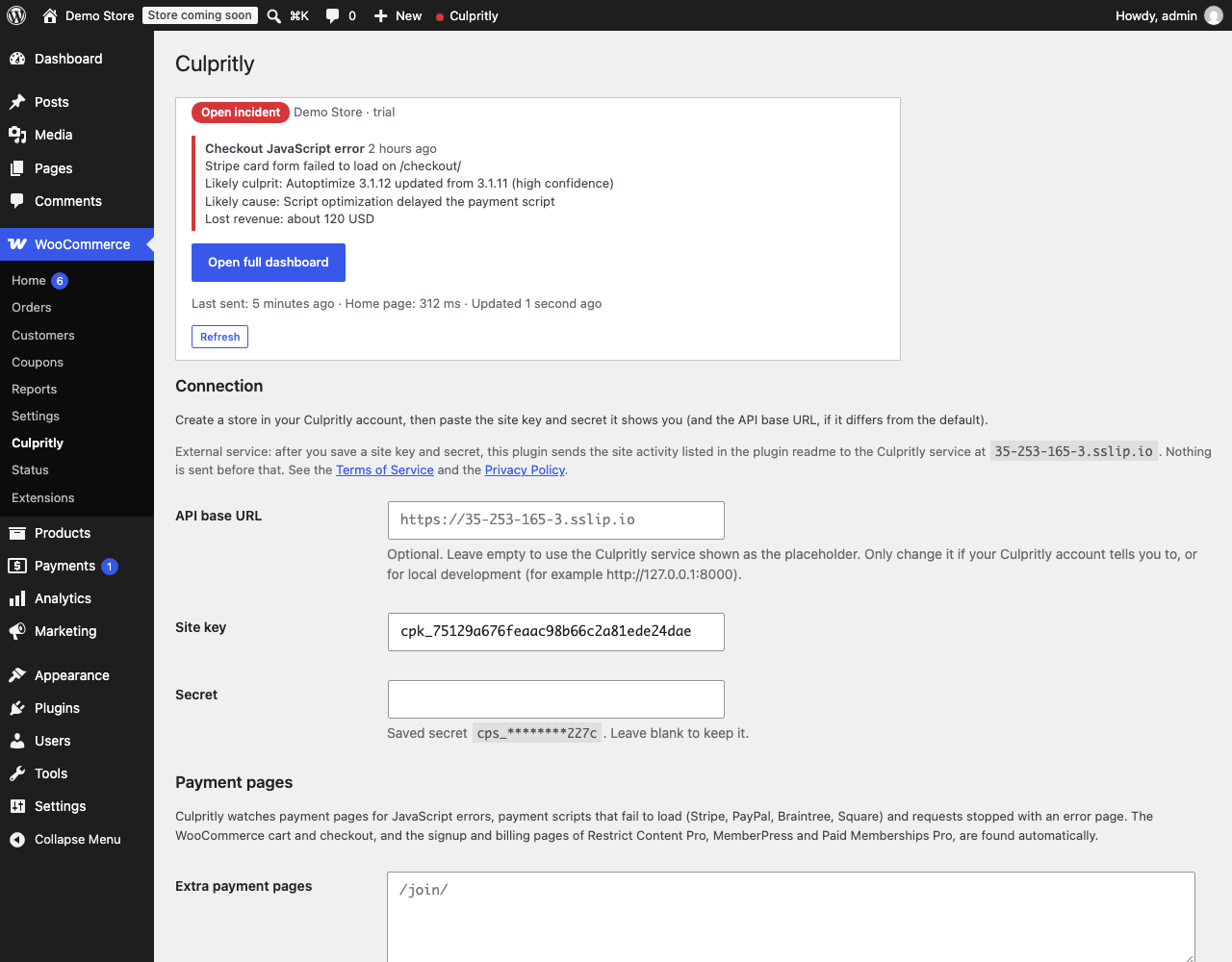 The Culpritly settings page: status panel, the External service notice with links to the Terms and Privacy Policy, and the connection fields. The admin bar item with its status dot is visible at the top.
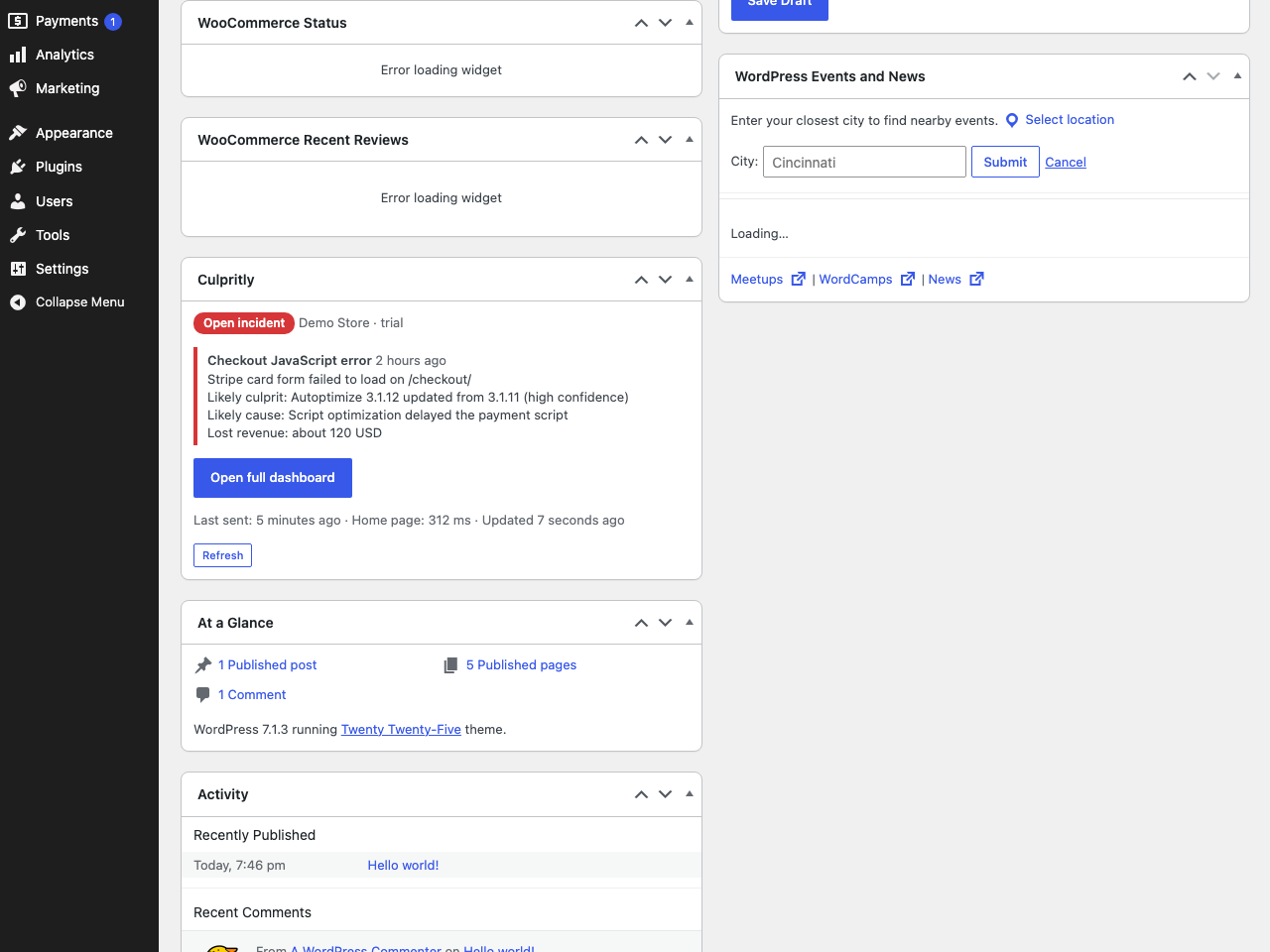 The Culpritly dashboard widget with an open incident, the likely culprit and a link to the full Culpritly dashboard.
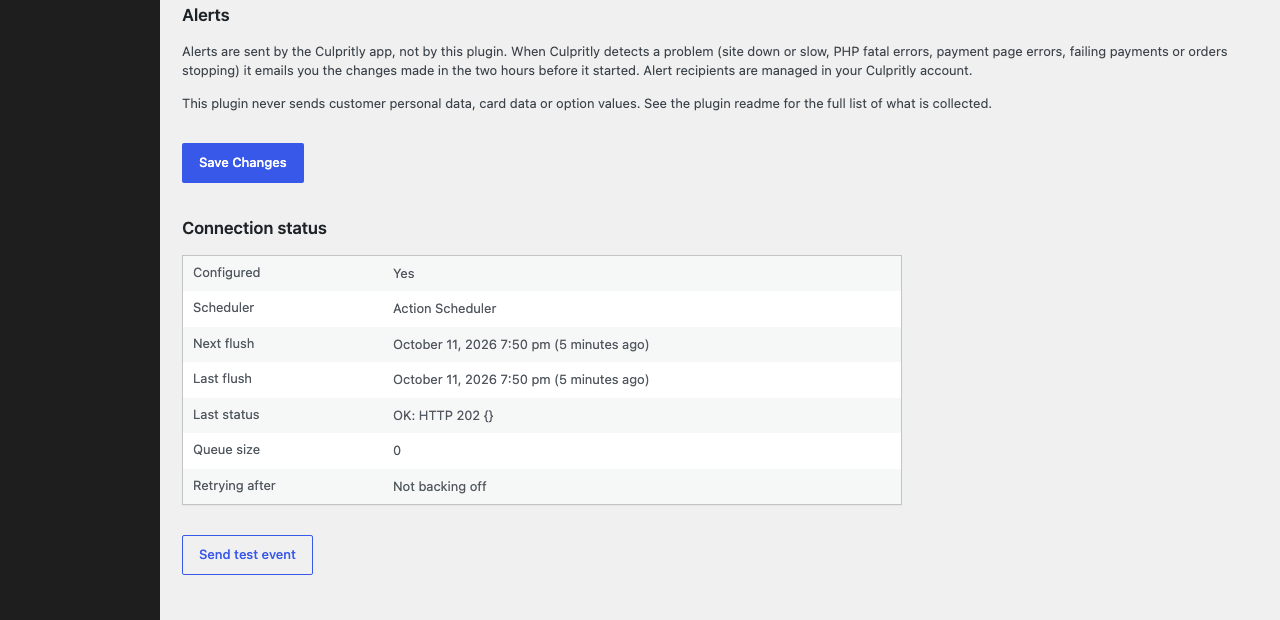 Connection status and the "Send test event" button.
Analytics
Live from WordPress.org, refreshed daily. Last refresh Oct 16, 2026.
- Passes every health check below.
Health checks
Everything a careful site owner looks at before installing.
- Actively maintained Last release 6 hours ago
- Tested with current WordPress Tested up to 7.1.3
- Support questions answered Nothing open in the last two months
- Well rated No ratings yet
- Latest day
- 46
- Typical day
- 46
- Peak
- 46 Oct 15
View as table
| Day | Downloads |
|---|---|
| Oct 15 | 46 |
Not ranked yet. Install, download and rating ranks cover the 5,000 most popular plugins on WordPress.org, and Trending needs about 100 downloads on a typical day.
Building the install history
WordPress.org only publishes today's install count, so WPFolks records it daily. The chart appears after two weeks.
Day 1 of 14Reviews
From folks on WPFolks
No reviews from folks yet. Used it? Be the first to say how it went.