


- Active installs
- 7k+
- 125 ratings
- 4.5
- Last updated
- 1 week ago
- Version
- 6.2.7
- Tested up to
- WP 7.1.3
About this plugin
Social Media Auto Poster connects your WordPress site to Buffer, enabling automatic social media publishing whenever you create or update content. Share your blog posts, pages, and custom post types to multiple social networks without manual posting.
Why Choose This Social Media Automation Plugin?
This plugin eliminates repetitive social media posting by automatically adding your WordPress content to your Buffer queue. Buffer then intelligently schedules posts to your connected social networks at optimal times for maximum engagement.
Automatic Social Media Publishing – Set it once and your content automatically shares to social media when published or updated.
Smart Scheduling with Buffer – Buffer’s queue system prevents spam by spacing out posts according to your schedule. Your social media profiles stay active without overwhelming followers.
Compatible Social Networks – Auto post to Facebook Pages, Twitter (X), LinkedIn Pages and Profiles, Threads, Google Business Profile, Mastodon, Bluesky, and TikTok.
Dynamic Content Templates – Customize each social media post using template tags that pull your post title, excerpt, content, featured image, categories, tags, and custom fields.
Don’t have a Buffer account? Sign up for free
How to Auto Post to Social Media with Buffer
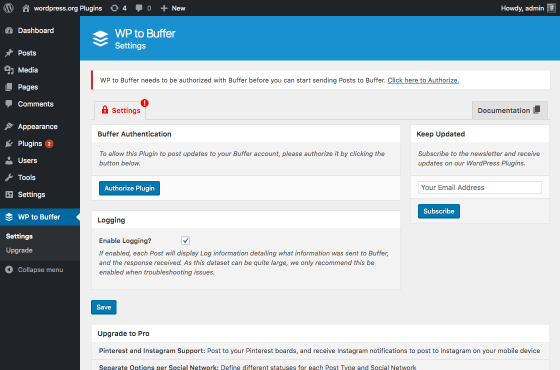
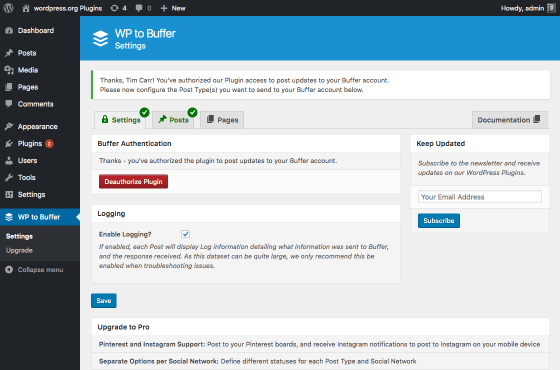
- Connect Your Buffer Account – Simple one-click authorization, no API keys or technical setup required
- Link Your Social Networks – Connect Facebook, X/Twitter, LinkedIn, and other profiles through Buffer’s interface
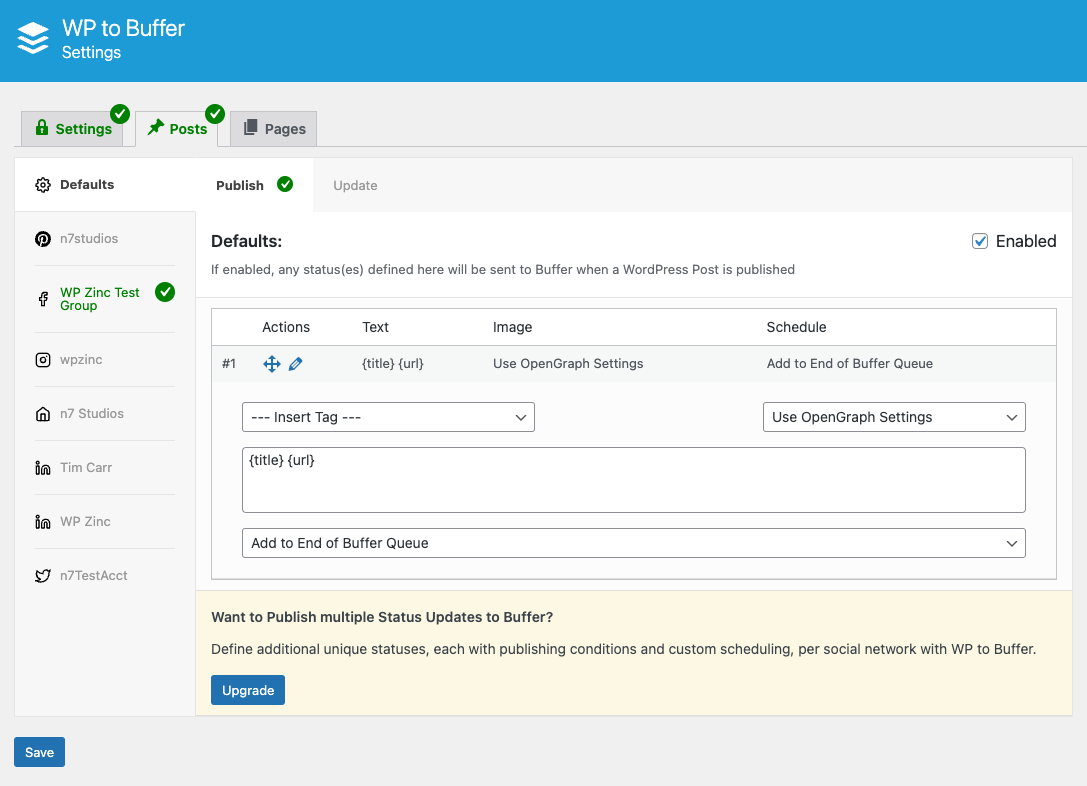
- Configure Post Settings – Choose which post types to share and customize your social media message templates
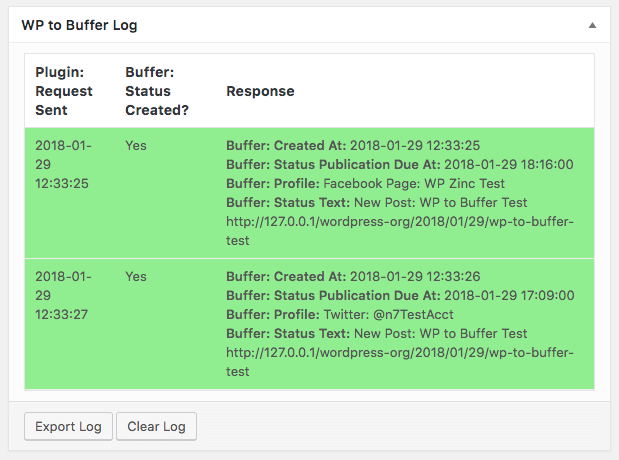
- Publish Content – Your WordPress posts automatically share to social media according to your Buffer schedule
Social Media Networks Supported
Facebook Auto Posting – Share to Facebook Pages automatically when you publish WordPress content.
X/Twitter Auto Posting – Still works! Buffer is not impacted by X/Twitter API changes. Auto post to Twitter (X) reliably.
LinkedIn Auto Posting – Publish to LinkedIn Company Pages and personal LinkedIn Profiles to grow your professional network.
Instagram & Pinterest (Pro) – Direct posting to Instagram Business Profiles (Feed and Stories) and Pinterest Boards available in Pro version.
Additional Networks – Threads, Google Business Profile, Mastodon, Bluesky, and TikTok support included.
Dynamic Template Tags for Customized Posts
Create unique social media messages using template tags:
- {title} – Your post title
- {excerpt} – Post excerpt (with character/word limits)
- {content} – Post content (with character/word limits)
- {url} – Post permalink
- {date} – Publication date
- {taxonomy_post_tag} – Tags as hashtags
- {taxoomy_category} – Categories as hashtags
Better Than Traditional Auto Posting Plugins
Unlike direct posting plugins (WP to Facebook, WP to Twitter clones), this plugin uses Buffer’s smart queue system. Benefits include:
Prevents Social Media Penalties – Buffer spaces posts naturally, avoiding spam flags from posting too frequently
Optimized Timing – Schedule posts for when your audience is most active
Cross-Network Management – Manage all social networks from one Buffer dashboard
No API Complications – Buffer handles all social network API connections and changes
Duplicate Prevention – Built-in protection ensures you never post the same content twice
Trusted Buffer API Partner
We’re an official Buffer Partner (since October 2020), ensuring reliable access to Buffer’s API for seamless social media automation.
Pro Version Features
WordPress to Buffer Pro includes advanced social media automation features:
Instagram and Pinterest Support – Direct posting to Instagram Business Profiles (Feed and Stories) and Pinterest Boards
Multiple Buffer Accounts – Connect multiple Buffer accounts to one WordPress site
Advanced Scheduling Options – Post immediately, add to start/end of Buffer queue, or schedule for specific times
Conditional Publishing – Send posts to social media based on author, category, tags, or custom field values
Multiple Status Templates – Create different messages for each social network with unique templates per post type
Repost Old Posts – Automatically reshare evergreen content on social media at scheduled intervals
Bulk Publish Feature – Manually select and republish multiple posts to social media at once
Event Calendar Integration – Schedule social posts based on event dates from The Events Calendar, Event Manager, and Modern Events Calendar
WooCommerce Integration – Display product prices, SKUs, and other WooCommerce data in social media posts
SEO Plugin Integration – Use SEO titles, descriptions, and meta data from Yoast SEO, Rank Math, All-In-One SEO Pack, and SEOPress
Advanced Custom Fields Support – Pull any custom field data into social media messages
Multiple Images – Share multiple images from Featured Image, Media Gallery, Post Content, or ACF Image fields
WP-Cron Support – Queue posts to send via WP-Cron for better performance on high-traffic sites
Priority Email Support – One-on-one support with our team
How to Schedule Social Media Posts
Default Buffer Schedule – Buffer automatically spaces posts throughout the day based on your time zone preferences
Custom Posting Schedule (Pro) – Define specific days and times in Buffer when posts should publish to each social network
Immediate Posting (Pro) – Override the queue and post immediately to social media
Scheduled Publishing (Pro) – Set exact date and time for each social media post
Support for Free Version
We provide community support through the WordPress support forums.
For priority email support, comprehensive documentation, and faster response times, consider upgrading to Pro.
Privacy and Data Usage
Our API connects your website to Buffer. An account with Buffer is required.
We connect directly to your Buffer (buffer.com) account, via their API, to:
– Fetch your social media profile names and IDs,
– Send your WordPress Posts to one or more of your social media profiles. The profiles and content sent will depend on the plugin settings you have configured.
We connect to our own API to pass the following requests through to Buffer:
– Connect our Plugin to Buffer, when you click the Authorize button (this obtains an access token from Buffer, once you have approved authorization)
Both of these are done via our own API, to ensure that no secret data (such as oAuth client secret keys) are included in this Plugin’s code or made public.
We never store any information on our web site or API during this process.
Screenshots
Analytics
Live from WordPress.org, refreshed daily. Last refresh Oct 18, 2026.
- Downloads on a typical day are up 86% on the month before.
- Passes 3 of 4 health checks below.
Health checks
What a careful site owner looks at before installing.
- Actively maintained Last release 1 week ago
- Tested with current WordPress Tested up to 7.1.3
- Support questions answered 2 of 3 resolved in two months
- Well rated 4.5 stars from 125 ratings
- Latest week
- 1,344
- Typical week
- 810
- Peak
- 12,039 Week of May 31
View as table
| Week | Downloads |
|---|---|
| Week of Oct 11 | 1,344 |
| Week of Oct 4 | 5,316 |
| Week of Sep 27 | 4,277 |
| Week of Sep 20 | 1,635 |
| Week of Sep 13 | 8,274 |
| Week of Sep 6 | 642 |
| Week of Aug 30 | 876 |
| Week of Aug 23 | 5,182 |
| Week of Aug 16 | 10,371 |
| Week of Aug 9 | 427 |
| Week of Aug 2 | 485 |
| Week of Jul 26 | 628 |
| Week of Jul 19 | 807 |
| Week of Jul 12 | 2,397 |
| Week of Jul 5 | 7,352 |
| Week of Jun 28 | 4,856 |
| Week of Jun 21 | 4,748 |
| Week of Jun 14 | 4,973 |
| Week of Jun 7 | 4,813 |
| Week of May 31 | 12,039 |
| Week of May 24 | 8,622 |
| Week of May 17 | 5,006 |
| Week of May 10 | 521 |
| Week of May 3 | 505 |
| Week of Apr 26 | 504 |
| Week of Apr 19 | 795 |
| Week of Apr 12 | 1,069 |
| Week of Apr 5 | 4,943 |
| Week of Mar 29 | 4,433 |
| Week of Mar 22 | 405 |
| Week of Mar 15 | 439 |
| Week of Mar 8 | 813 |
| Week of Mar 1 | 532 |
| Week of Feb 22 | 753 |
| Week of Feb 15 | 1,164 |
| Week of Feb 8 | 4,347 |
| Week of Feb 1 | 308 |
| Week of Jan 25 | 316 |
| Week of Jan 18 | 342 |
| Week of Jan 11 | 350 |
| Week of Jan 4 | 369 |
| Week of Dec 28, 2025 | 296 |
| Week of Dec 21, 2025 | 308 |
| Week of Dec 14, 2025 | 464 |
| Week of Dec 7, 2025 | 647 |
| Week of Nov 30, 2025 | 976 |
| Week of Nov 23, 2025 | 803 |
| Week of Nov 16, 2025 | 5,168 |
| Week of Nov 9, 2025 | 472 |
| Week of Nov 2, 2025 | 582 |
| Week of Oct 26, 2025 | 748 |
| Week of Oct 19, 2025 | 1,399 |
Gathering install data
WordPress.org only publishes today's install count, so WPFolks records it every day. The chart appears here once there is enough history to draw.
Reviews
From folks on WPFolks
No reviews from folks yet. Used it? Be the first to say how it went.