
- Last updated
- 3 days ago
- Version
- 1.0.0
- Tested up to
- WP 7.1.4
About this plugin
WordPress has settings with no settings screen: the quality and format images are saved in, how long a login lasts, who WordPress email comes from, how long it waits for other sites. Changing them normally means writing a filter.
Yet Another Tweaks Manager puts those dials in one place, under Settings Yet Another Tweaks. Every feature stays on; you choose how it behaves. Leave a field empty and WordPress uses its own default. An empty field adds no code at all.
Want to switch features off instead, or cap things like revisions, Heartbeat or trash? That’s The Off Switch. The two plugins never cover the same feature, so they work side by side.
Media
- JPEG, WebP and AVIF quality: 1–100 (defaults 82, 86 and 82), for new uploads.
- Save JPEG uploads as WebP or AVIF: the full-size image and every resized copy are saved in the modern format; the uploaded original is kept. Falls back to JPEG if your server can’t write the format — the settings page tells you what it supports.
- Image editor: prefer Imagick or GD, with the other kept as a fallback. Imagick keeps camera and copyright data (EXIF, IPTC, XMP) in resized images; GD removes it.
- Progressive JPEGs: resized JPEGs appear blurry first and sharpen as they load (WordPress 6.5+).
- Largest image width offered to browsers: 300–10000 pixels (default 2048).
- Maximum upload size: lower the server’s limit, in MB.
Login
- Login session length: 1–365 days (default 2).
- “Remember Me” length: 1–365 days (default 14).
- Page after login: home page or profile instead of the Dashboard. A link to any other page still takes people there.
- Form security lifetime: how long nonces in admin forms and links stay valid, 2–168 hours (default 24).
Editing
- Post lock hold time: how long a post stays locked after its editor stops checking in, 150–3600 seconds (default 150).
- Automatic excerpt length and ending: words in an automatic excerpt (default 55) and the text after it (default “[…]”). On block themes the Post Excerpt block has its own controls, so these apply to feeds and other excerpts.
- “From” address and “From” name for email WordPress sends (defaults
wordpress@yourdomainand “WordPress”). Only the default sender is replaced: emails where a plugin sets its own sender, like a contact form, are left alone. This changes who mail appears to come from, not how it is delivered. - Recovery mode email interval: the shortest time between two “your site has a technical issue” emails, 1–720 hours (default 24).
Connections
- Request timeout: how long WordPress waits for another site to answer (default 5 seconds). Raise it if updates or the plugin directory fail on a slow connection.
No .htaccess writes, no minification, no upsell.
Screenshots
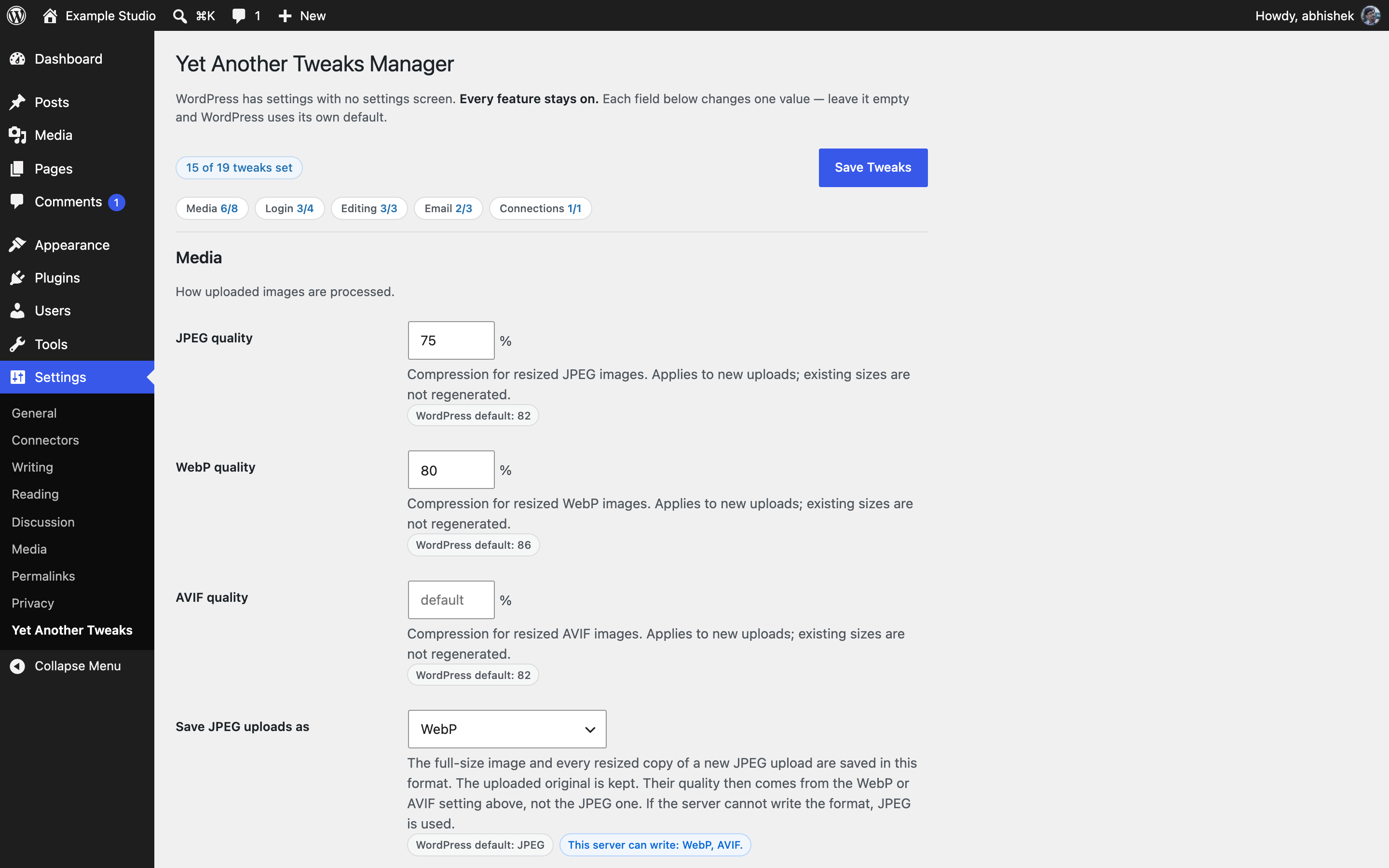 One screen for every tweak: a count of what's set, section links with per-section counts, and image quality with WordPress's default shown under each field.
 More image settings, with notes on what this server supports: which image editors are installed and which formats it can write.
 Login length, "Remember Me" length, the page people land on after login, and form security lifetime.
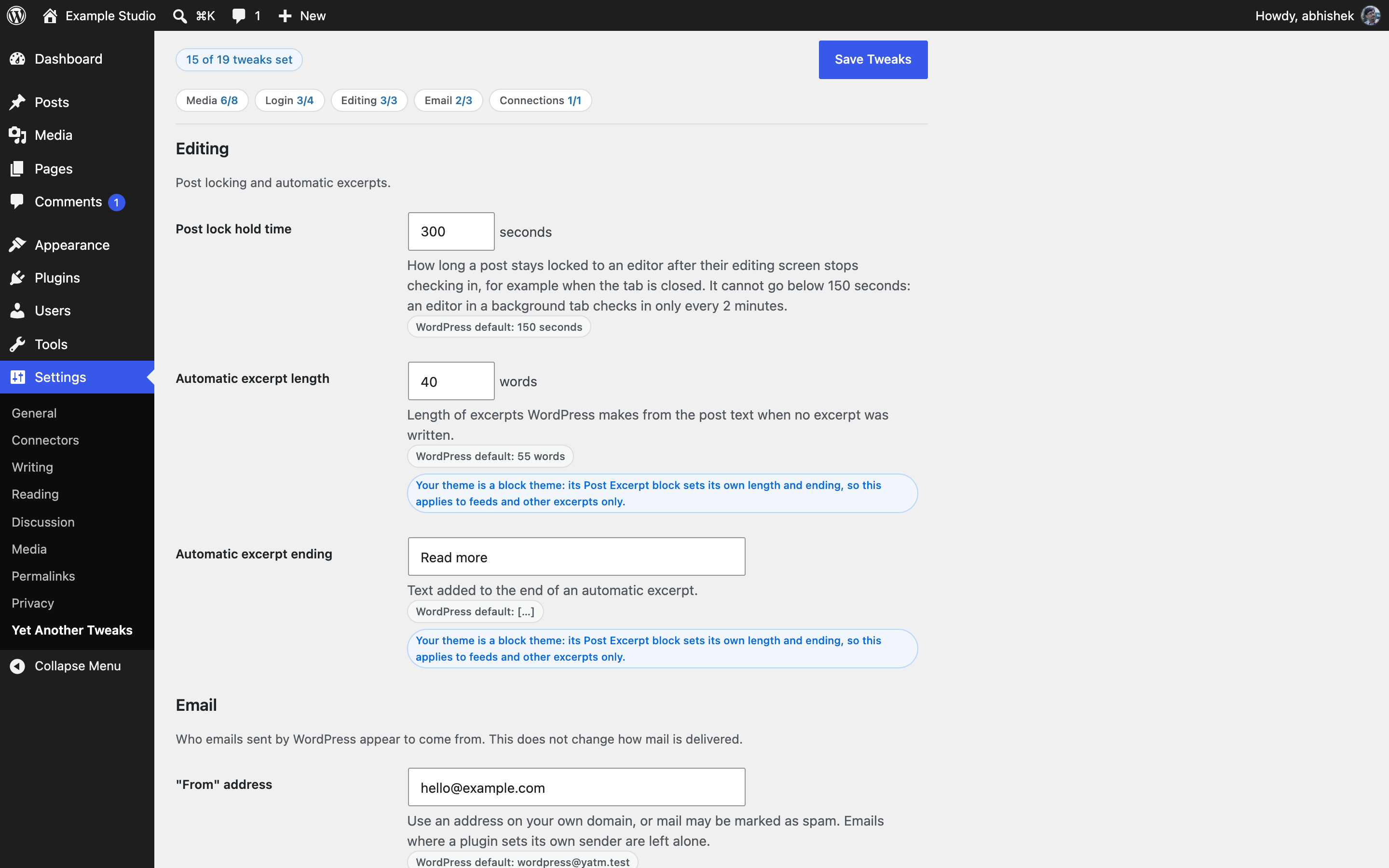 Post lock hold time and automatic excerpts, with a note when a block theme's Post Excerpt block overrides them.
 Email sender address and name, recovery mode email interval, and the timeout for requests to other sites.
Analytics
Live from WordPress.org, refreshed daily. Last refresh Nov 1, 2026.
- Passes every health check below.
Health checks
Everything a careful site owner looks at before installing.
- Actively maintained Last release 3 days ago
- Tested with current WordPress Tested up to 7.1.4
- Support questions answered Nothing open in the last two months
- Well rated No ratings yet
- Latest week
- 60
- Typical week
- 1
- Peak
- 60 Week of Oct 25
View as table
| Week | Downloads |
|---|---|
| Week of Oct 25 | 60 |
| Week of Oct 18 | 1 |
| Week of Oct 11 | 0 |
| Week of Oct 4 | 3 |
| Week of Sep 27 | 4 |
| Week of Sep 20 | 1 |
| Week of Sep 13 | 2 |
| Week of Sep 6 | 0 |
| Week of Aug 30 | 2 |
| Week of Aug 23 | 0 |
| Week of Aug 16 | 1 |
| Week of Aug 9 | 0 |
| Week of Aug 2 | 2 |
| Week of Jul 26 | 0 |
| Week of Jul 19 | 0 |
| Week of Jul 12 | 1 |
| Week of Jul 5 | 1 |
| Week of Jun 28 | 2 |
| Week of Jun 21 | 0 |
| Week of Jun 14 | 0 |
| Week of Jun 7 | 0 |
| Week of May 31 | 0 |
| Week of May 24 | 1 |
| Week of May 17 | 2 |
| Week of May 10 | 0 |
| Week of May 3 | 0 |
| Week of Apr 26 | 3 |
| Week of Apr 19 | 0 |
| Week of Apr 12 | 1 |
| Week of Apr 5 | 0 |
| Week of Mar 29 | 2 |
| Week of Mar 22 | 1 |
| Week of Mar 15 | 2 |
| Week of Mar 8 | 1 |
| Week of Mar 1 | 0 |
| Week of Feb 22 | 1 |
| Week of Feb 15 | 1 |
| Week of Feb 8 | 0 |
| Week of Feb 1 | 0 |
| Week of Jan 25 | 0 |
| Week of Jan 18 | 0 |
| Week of Jan 11 | 1 |
| Week of Jan 4 | 0 |
| Week of Dec 28, 2025 | 1 |
| Week of Dec 21, 2025 | 0 |
| Week of Dec 14, 2025 | 0 |
| Week of Dec 7, 2025 | 0 |
| Week of Nov 30, 2025 | 2 |
| Week of Nov 23, 2025 | 0 |
| Week of Nov 16, 2025 | 1 |
| Week of Nov 9, 2025 | 0 |
| Week of Nov 2, 2025 | 0 |
Not ranked yet. Install, download and rating ranks cover the 5,000 most popular plugins on WordPress.org, and Trending needs about 100 downloads on a typical day.
Gathering install data
WordPress.org only publishes today's install count, so WPFolks records it every day. The chart appears here once there is enough history to draw.
Reviews
From folks on WPFolks
No reviews from folks yet. Used it? Be the first to say how it went.