- Last updated
- 2 days ago
- Version
- 2.0.5
- Tested up to
- WP 7.1.4
About this plugin
GeoDirectory MLS Import connects your site to your MLS through the RESO Web API and imports listings into GeoDirectory.
Enter the credentials your MLS or IDX vendor issued you, pick a dataset, choose which listings you want, and GeoDirectory MLS Import keeps them in sync on a schedule you control.
What it does
- Imports from any RESO Web API (OData) compliant feed.
- Maps RESO fields onto GeoDirectory custom fields, overridable per import.
- Downloads listing photos to your media library, or hotlinks the MLS image URLs.
- Runs in the background, so large datasets import without timing out. Pause, resume or stop a run at any time, and resume an interrupted one where it left off.
- Previews a run before you start it, showing what would be imported, updated or skipped without changing anything.
- Re-runs hourly, daily, weekly or monthly, updating only listings that changed.
- Optionally trashes listings that have left the feed.
- Logs every listing processed, skipped or failed.
Filtering
Narrow an import by:
- Listing status, property type and subtype
- State, city, street address and postal code
- Listing agent and office, including exclusions
- Price range and price display rules
- A maximum number of listings, or one listing by
ListingId/ListingKey - Any custom OData filter expression your feed supports
Filters are sent to the provider as part of the query, so narrowing happens at the feed.
Your import
The plugin manages one import: a saved configuration of dataset, filters, field mapping and schedule, with scheduling, images and every filter above included. Change any of it whenever you like, or point it at a different dataset.
Supported MLS platforms
Presets ship for Trestle, Bridge Data Output, Spark Platform and Navica. Paragon, Rapattoni and other RESO Web API providers need their endpoints added with the geomls_service_config filter. If your MLS is not listed, contact AyeCode support.
Requirements
- GeoDirectory 2.3 or higher
- RESO Web API credentials from your MLS or IDX vendor
GeoDirectory MLS Import does not include, resell or provide access to any MLS data. You must have your own agreement with, and credentials from, your MLS or IDX vendor.
External services
This plugin contacts a third-party MLS or IDX provider to retrieve the listings you ask it to import. Nothing is sent anywhere until you enter API credentials and run an import.
Which service is contacted
The RESO Web API endpoint belonging to the MLS or IDX vendor you configure under GeoDirectory > Settings > MLS Import. The plugin contacts no endpoint of its own. Presets are provided for the following, and a developer can add other RESO Web API endpoints with the geomls_service_config filter:
- Trestle by Cotality –
api-trestle.corelogic.com(terms, privacy policy) - Bridge Data Output –
api.bridgedataoutput.com(terms, privacy policy) - Spark Platform –
sparkapi.com(terms, privacy policy) - Navica –
navapi.navicamls.net(privacy policy, published by its operator Systems Engineering, Inc.). Navica publishes no public terms-of-use page for the API; access is granted by your MLS and governed by the data agreement they issue you. - Paragon – endpoints supplied by your MLS and added with the filter above
- Rapattoni – endpoints supplied by your MLS and added with the filter above
When requests are made
- When you save API credentials, to verify they work.
- When you load or refresh the list of datasets available to your account.
- When you search for an agent, office or other filter value while building an import.
- When you preview an import.
- When an import runs, manually or on its schedule.
- When listing images are downloaded, if you enabled that. Images come from the image host named in the feed, which your MLS chooses.
What is sent
- Your API credentials (client ID, client secret, server token, or username and password, depending on the provider), to authenticate.
- The OData query built from your filters, containing only the field names and values you selected.
No WordPress user data, site content or information about your visitors is transmitted.
What is received
Property listing records and media URLs from the dataset you selected, stored as GeoDirectory listings on your site.
Your use of these services is governed by your own agreement with your MLS or IDX vendor, in addition to the terms and privacy policies above.
Screenshots
 Your import at a glance: schedule, latest run, active filters and settings.
 Import settings: title format, GeoDirectory post type, listing status, author and schedule.
 Filters: import only the listing statuses, locations and price range you want.
 Choose which MLS fields to import, with 40 common RESO fields included automatically.
 Map any MLS field onto your own GeoDirectory custom fields.
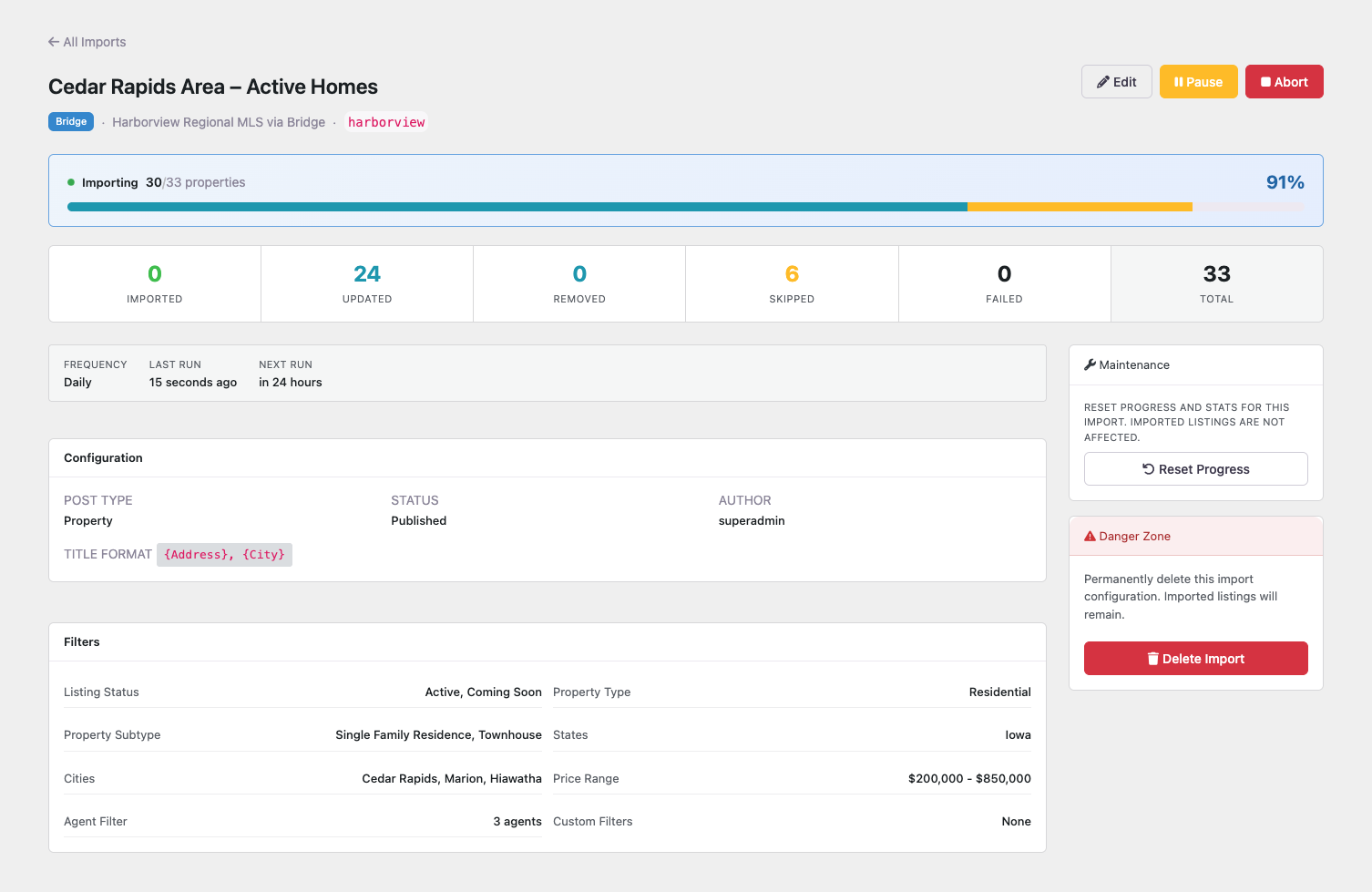 A running import, with live progress and pause and stop controls.
 The activity log records every listing each run creates, updates or skips.
 Connect your MLS under GeoDirectory settings.
Analytics
Live from WordPress.org, refreshed daily. Last refresh Nov 8, 2026.
- Passes every health check below.
Health checks
Everything a careful site owner looks at before installing.
- Actively maintained Last release 2 days ago
- Tested with current WordPress Tested up to 7.1.4
- Support questions answered Nothing open in the last two months
- Well rated No ratings yet
- Latest day
- 94
- Typical day
- 72
- Peak
- 94 Nov 7
View as table
| Day | Downloads |
|---|---|
| Nov 7 | 94 |
| Nov 6 | 49 |
Not ranked yet. Install, download and rating ranks cover the 5,000 most popular plugins on WordPress.org, and Trending needs about 100 downloads on a typical day.
Gathering install data
WordPress.org only publishes today's install count, so WPFolks records it every day. The chart appears here once there is enough history to draw.
Reviews
From folks on WPFolks
No reviews from folks yet. Used it? Be the first to say how it went.